
Manage News Item(s)
How to add, delete, move, hide, or change the order sequence of a news item?
You can create as many news items as you want, if you do have over a hundred of items in a same menu, this might affects the performance. In such case, you had better organize/separate them by different sub-menu items.How to add a news item?
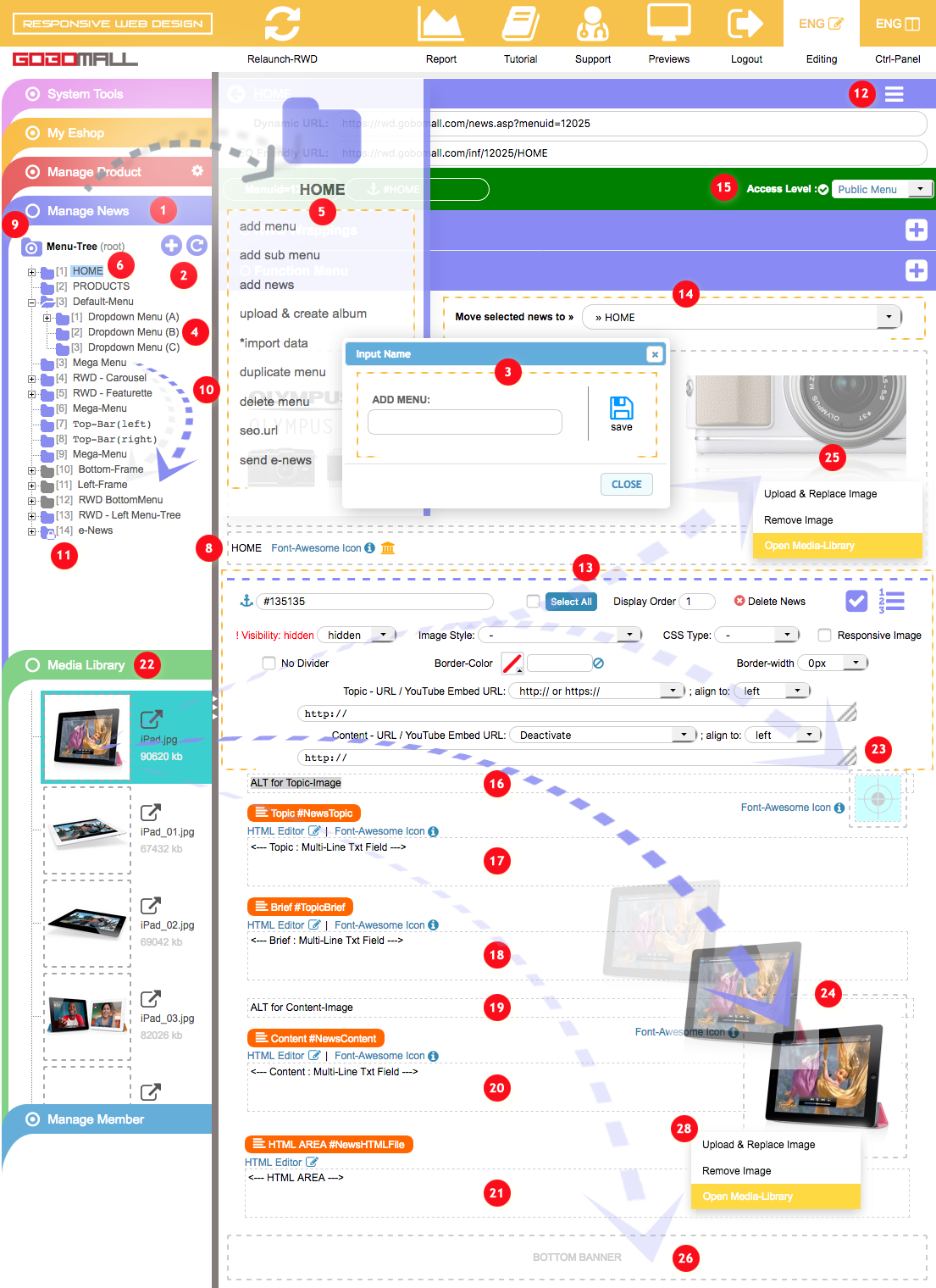
- Extend "Manage News" {~1~} on left-frame;
- right-click on any target menu {~4~} or click on that navigation icon {~12~} to open right-click pull-out menu {~5~};
- click on "add news" in {~5~} for adding news items to a menu;
- "ADD NEWS" dialog will then be opened;
- click "save" to confirm action.
How to delete a news item?
In {~13~}, just click on that "delete news" icon for a deletion.
How to move the news items from one to another?
In {~13~}, check the box next to the button "select all", and then select a move-to target from that drop-down menu {~14~}.
How to change the order sequence of a news Item?
In {~13~}, change the "Display Order" number, then click on any blank area to save the changes.
How do I hide a news item?
In {~13~}, just change the option "visibility" from "visible" to "hidden".
How to edit text content of a news item?
Double-click on Topic {~17~}, Brief {~18~}, Content {~20~}, or HTML Area{~21~} to open HTML Editor to start with.
How to insert an image to "Topic-Image" or "Content-Image" area of a news item? or remove? or replace? or adding alternative-text? or find out its location in the "Media Library"?
How to insert an image to "Topic-Image" or "Content-Image" area of a news item?
Each news item contains two image drop-targets reveals in bright-blue color, the upper one is reserved for the "Topic-Image", and the lower one is for adding the "Content-Image":
- Get to the target news item;
- explore the image file in "Media Library" {~22~};
- if the image is already exists, you can directly drag it from the "Media Library" and drop it to the "Topic-Image" {~23~} or "Content-Image" {~24~} area.
See also "Drag & Drop Capability".
If not, you should have it being uploaded to the "Media Library" first:See also "Multiple File Uploader"
How to remove a "Topic-Image" or "Content-Image" from a news item?
Right-click on any target image {~24~} to open the right-click pull-out {~28~}, then select - "Remove Image".
How to replace a "Topic-Image" or "Content-Image" ?
Right-click on any target image {~24~} to open the right-click pull-out {~28~}, then select - "Upload & Replace Image".
How to input an alternative-text for the "Topic-Image" or "Content-Image" ?
Double-click on "ALT for Topic-Image" {~16~} or "ALT for Content-Image" {~19~}, input the alternative-text, then click on any blank area to confirm the changes.
How to find out its location in the "Media Library"?
Right-click on any target image {~24~} to open the right-click pull-out {~28~}, then select - "Open Media Library".
How to manage the linkage of "Topic-Image" or "Content-Image"? or adding responsive YouTube videos?
You will have the following options in {~13~} - Topic/Content - URL / YouTube Embed URL:
- Deactivate
No click action(default). - http:// or https://
Pick this option, then input an internal/external link into the text-field right below it.
Example: adding an internal link:
P.S. The website address can be omitted from the URL.
1) /inf/25252/open-eshop/feature-highlights
2) /cat/22552/computer/keyboard - Link to this page
An internal link for driving a click to this page will be added to the image. - lightbox: Open topic/content-image
The JQ lightbox component will be applied to the image, and the lightbox effect will be used for popping up a large image. - Open topic/content-URL Download URL (PDF, DOC, XLS etc...)
We suppose the URL is pointing to a download document, you can pick this option to fire a download when people clicking on the image. - YouTube Embed URL (16:9) / (4:3)
Pick this option, then input the YouTube embed URL into the text-field right below it, just omit all HTML tags and only grab the URL, such as < iframe ... /iframe >.
You only need to input the URL, e.g. - https://www.youtube.com/embed/OEqDiZuSpis?rel=0.
How to styling a news items?
- Specify a friendly anchor name for a "#hash" navigating to the fragment identifier within a HTML document:
Refer to the "Anchor" icon in {~13~}, just input a friendly name to replace the default "newsid". - Apply image style:
Pick an option from the dropdown - "Image Style" in {~13~}. - Apply CSS type:
Pick an option from the dropdown - "CSS Type" in {~13~}. - Responsive Image:
Uncheck the box - "Responsive Image" in {~13~} to disable responsive image effect, the size of image will then be adjustable thru the "Function Menu". - No Divider:
Check the box in {~13~}, the bottom margin and horizontal line will be ignored. - Border-Width and Border-Color:
The border of a news item will be applied if the "Border-Width" selection is greater than "0px".